Variant Beaufort

From the Buttcrack Cipher Wiki — the free field guide to classical ciphers

Try this cipher → Load its worked example and preselect its method.

Reading tools:

Variant Beaufort — C = P - K. Vigenere's rule run in the decryption direction.

C = P - K: Vigenere encryption with the decryption rule.
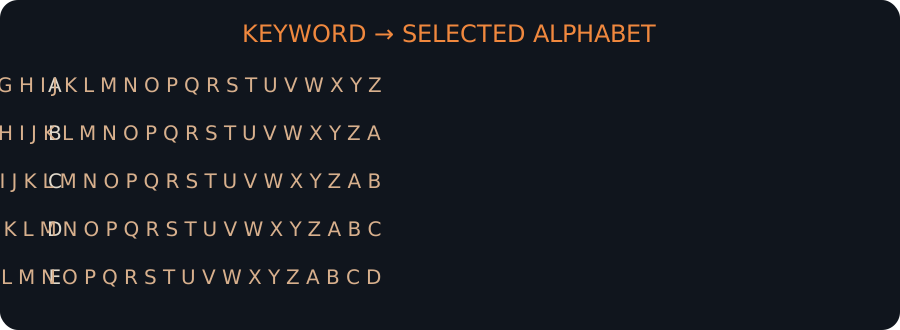
Polyalphabetic cipher tableau
Polyalphabetic cipher tableau. Original explanatory artwork prepared for the Cipher Wiki; it is not documentary evidence or a claim about any specific ciphertext.

A worked example§

Encrypting a sample with the cipher itself, at build time:

MEET ME BY THE OLD CLOCK TOWER AT DAWN

Key: LEMON

produces the ciphertext

BASF ZT XM FUT KZP PAKQW GDSSD NI ZOIA

This example is generated by running the cipher when the page is built, and the round trip is checked, so it always matches what the solver does.

How it is broken§

The same two-stage attack. A message solved under this name also solves under Vigenere with the complementary key, which is why the solver reports the better-known name on a tie.

History and context§

The German army's variant, and a good illustration that a cipher's identity is the algebra, not the label.

See also§

Vigenère · Beaufort · Gronsfeld · Porta · Quagmire III (keyed alphabet) · Sum-clock (additive wheels)

Browse every cipher in the Polyalphabetic ciphers family, read the history of codebreaking, or return to the wiki main page.

Frequently asked questions§

How is the Variant Beaufort broken?

The same two-stage attack. A message solved under this name also solves under Vigenere with the complementary key, which is why the solver reports the better-known name on a tie.

What key does the Variant Beaufort use?

keyword. The keyspace is unbounded in practice.

How much ciphertext do I need?

At least 24 characters for this solver to attempt it; short messages can be readable and still not be proof.

Can I break a Variant Beaufort on this page?

Yes — the browser solver on this page handles it directly. Paste the ciphertext into the solver and press the button.

The facts in this article are generated from buttcrack's cipher registry when the site is built, so they describe the implementation you can run on this page. Registry-generated content is checked against the code; the history is editorial.

Try it live — break a real puzzle

Private by design

Paste a puzzle. Explore a reading.

Runs on this device

Paste text and press Solve. Ctrl / ⌘ + Enter works too.

Advanced settings & examples

Auto-detect ranks English-looking candidates, not probabilities. A selected method never silently falls back to a different cipher.

Limits & verification boundaries

The browser tries selected classical methods, English statistical scoring and encoding layers. It also recognizes PK1–PK10 by exact normalized corpus equality. It cannot break properly implemented AES/RSA or prove an intended plaintext by a high score. Many wiki methods are only reference demonstrations here; their key-recovery attacks require the full version.

A supplied-key reading is arithmetic under your assumption, not independent confirmation. A worked-example reference is labelled as a build-time lookup, never a newly recovered answer. Rankings show actual returned candidates from a bounded search, which may contain fewer than five.

No analysis upload or account. Nothing is saved unless you choose Save below. This hosted page includes third-party advertising; use a locally served/offline copy for sensitive work.

Solver interface improvements

  • Mobile-first input and solve action, with compact navigation.
  • Simple by default; settings, candidate rankings, statistics and manual controls expand on demand.
  • Every cipher article has a Try this cipher action with its real method and full worked example.
  • Optional named investigations let you save, compare and restore attempts on your own device.
  • Explicit live-operation/reference labels, snapshot boundaries and no automatic text saving.
Optional local investigations — save, compare & restore

Explicit device-only storage, no account or cloud sync. Saved snapshots contain ciphertext, plaintext and keys; browser storage is not encrypted. Deleting browser data removes them. Restore does not run a new search or independently verify an old result.

No automatic text or result saving.

This tool is free and has no account, no upload, no tracking of your text

Everything runs in your browser. If it saved you time, keeping it alive costs nothing but a click.